Viro Is Now a Browser Extension
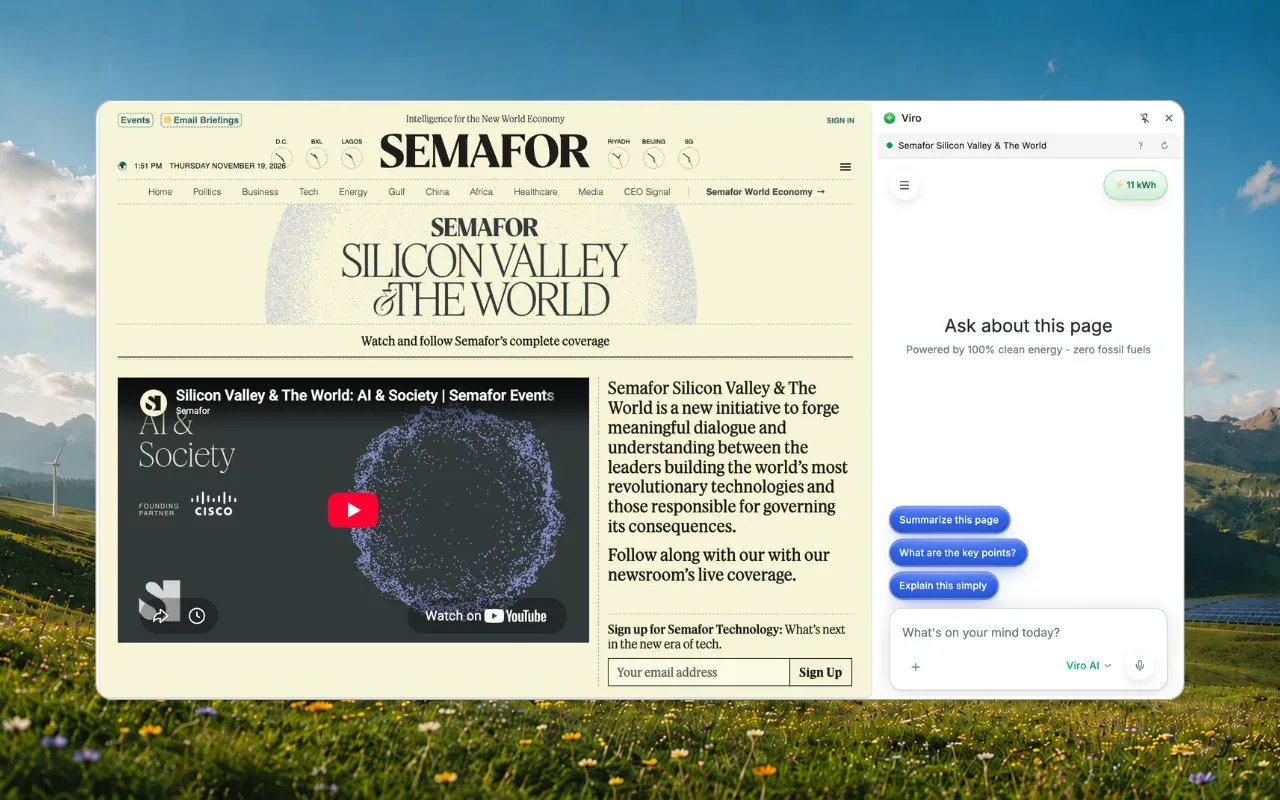
The free Viro extension puts AI in your browser's side panel, next to whatever you're reading. Summarize a page, pull out the key points or ask anything about it. Chrome, Edge and Brave.
Viro now lives in your browser.
The free Viro extension opens Viro in your browser’s side panel, right next to whatever you’re reading. Ask it to summarize the page, pull out the key points or explain something, without copying and pasting anything.
The short version
- Free on the Chrome Web Store.
- Chrome, Edge and Brave, on Mac, Windows, Linux and ChromeOS.
- Opens beside the page with the Viro icon, or Ctrl+Shift+Y (Windows) / Cmd+Shift+Y (Mac).
- Reads, never acts: it can read the page you’re on when you ask. It doesn’t click, type or fill in forms.
- Same Viro, same account: your chats land in your normal history, on the web and in the apps.
How to install it
- Add it to your browser. Open Viro on the Chrome Web Store and select Add to Chrome. Edge and Brave install it from the same page.
- Pin it. Select the puzzle-piece icon in your toolbar and pin Viro so it’s always there.
- Open it on a page. Select the Viro icon, or press Ctrl+Shift+Y (Cmd+Shift+Y on a Mac).
- Sign in. If you’re already signed in to Viro in this browser, the panel is too.
What you can ask about a page
A new chat in the panel starts with Ask about this page and three one-tap questions:
- Summarize this page
- What are the key points?
- Explain this simply
Or type your own: “What’s the return policy?”, “Which of these is cheapest?”, “Draft a reply to this.” Highlight a passage first and Viro knows which part you mean. It even works on pages behind your own sign-in, because it’s your browser.
There’s a full walkthrough in how to summarize a web page with AI, and a guide for students in AI study help in your browser.
What Viro can (and can’t) see
We kept this simple on purpose:
- Only the page beside the panel. Viro can’t see your other tabs.
- Only when you ask. The page’s text is read when your question is about the page. Its title and address go with your message so Viro knows what “this page” means.
- Read-only. The extension never clicks, types, fills in forms or submits anything.
When you install it, your browser may ask to let the extension “read and change all your data on all websites.” That’s the browser’s standard wording for any extension that can see pages. You can choose Not now instead, and Viro only sees a tab after you select its icon on that tab.
Your chats go with you
Each tab keeps its own chat, and every chat goes into your normal Viro history, marked with the site’s icon. Start reading on your laptop, pick it up later on your phone.
The panel keeps to the chat: your messages, your history and the model picker, including ChatGPT, Claude, Gemini and Viro’s own clean-powered model. Bigger tools like Design and Notebooks open in a normal tab.
Get it
Add Viro to Chrome: free, and it works in Edge and Brave too. Prefer an app? Viro is also on Windows, Mac, iPhone and Android, or on the web.
Frequently asked questions
Is there a Viro AI browser extension?
Yes. The Viro extension is free on the Chrome Web Store. It opens Viro in your browser's side panel, next to the page you're on.
Which browsers does the Viro extension work in?
Chrome, Edge and Brave, on Mac, Windows, Linux and ChromeOS. Edge and Brave install it from the same Chrome Web Store page.
What's the keyboard shortcut to open Viro?
Command+Shift+Y on a Mac and Ctrl+Shift+Y on Windows. Or select the Viro icon in your toolbar.
Can the Viro extension see my other tabs?
No. It can see only the page beside the panel, and it reads that page's text only when your question is about the page. It never clicks, types or fills in anything.
Do chats from the extension show up in the Viro app?
Yes. They go into your normal chat history, marked with the icon of the site they were about, so you can pick them up on the web or in the apps.
Sources
- Viro browser extension, Viro Help Center
- Viro on the Chrome Web Store, Google
Cover photo by Etienne Boulanger on Unsplash