How to Summarize a Web Page With AI (Without Copy and Paste)
Summarize any article or web page with AI in one click: no copying, no pasting. A step-by-step guide with a free AI side panel for Chrome, Edge and Brave, plus prompts that work.
Long article, short on time? You can get an AI summary of any web page in a couple of seconds, without copying the text into a chatbot.
The trick is an AI side panel: a browser extension that sits next to the page and can read it when you ask. Here’s how to do it with Viro’s free extension in Chrome, Edge or Brave.
The short answer
- Install the free Viro extension.
- Open the page you want summarized.
- Press Ctrl+Shift+Y (Windows) or Cmd+Shift+Y (Mac).
- Tap Summarize this page.
That’s it. No copy, no paste, no new tab.
Step by step
1. Add the extension
Open Viro on the Chrome Web Store and select Add to Chrome. It works the same in Edge and Brave. Pin it from the puzzle-piece menu so the icon stays in your toolbar.
2. Open the page and the panel
Go to the article, product page, docs or thread you want summarized. Select the Viro icon or use the keyboard shortcut. Viro opens beside the page, and the line at the top shows which page it can see (a green dot means it’s ready).
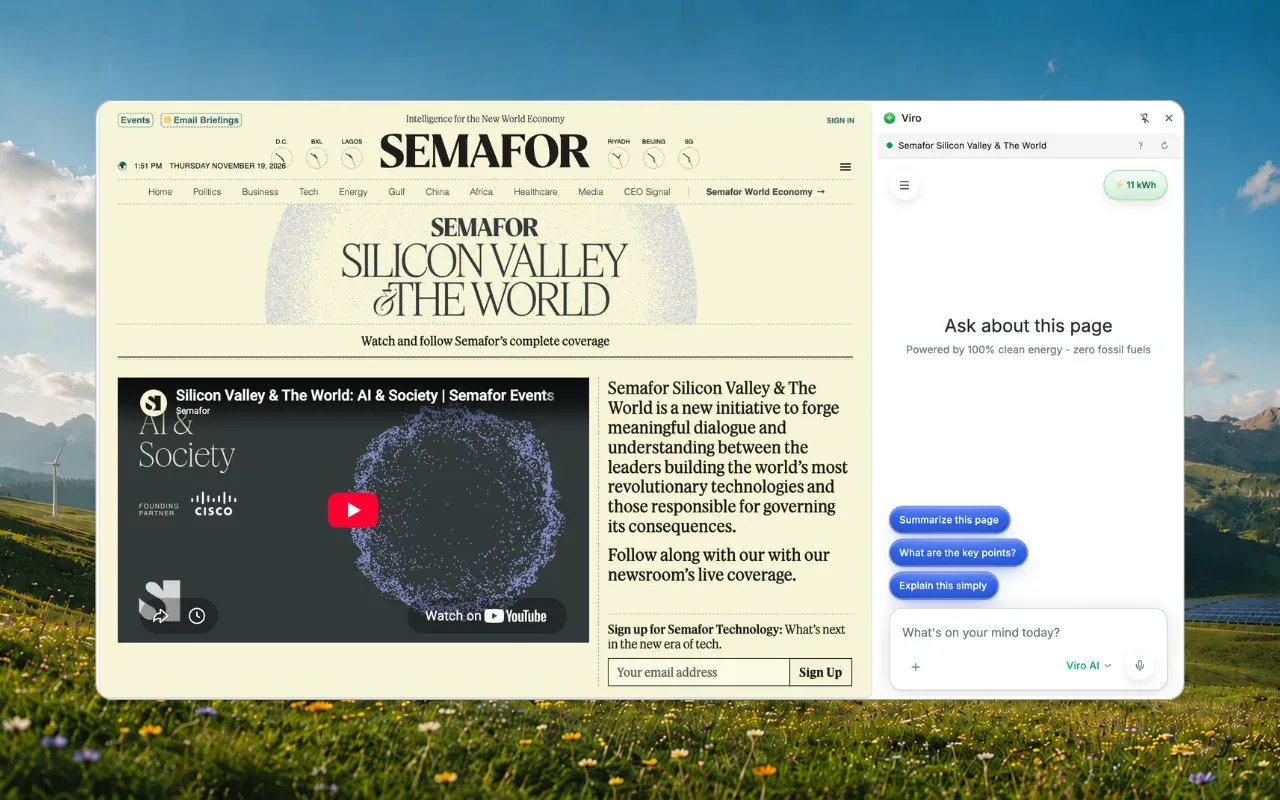
3. Ask
Every new chat starts with three one-tap options:
- Summarize this page: the gist in a few lines.
- What are the key points?: a bulleted list.
- Explain this simply: the same content in plain language.
Prompts that work better than “summarize”
A generic summary is fine. A specific question is better. Try:
- “Summarize this in 3 bullet points for someone who has 30 seconds.”
- “What’s the main argument, and what evidence does it give?”
- “What does this mean for me if I’m a renter in California?”
- “List every date and deadline on this page.”
- “What’s the return policy, and how long do I have?”
- “Compare the three plans on this page in a table.”
- “Summarize the comments: what do people agree and disagree on?”
Only care about one section? Highlight it first, then ask. Viro knows which part you mean.
When summarizing doesn’t work
- The page changed. Viro reads the page as it is when you ask. If more comments load or you move to the next slide, ask again.
- Browser pages. No extension can read your browser’s own pages (settings, a new tab, the extension store) or a file opened from your computer.
- Pictures of text. Some slide decks and scanned documents draw their words as images. Drag a screenshot into the chat instead.
- Very long pages. Viro reads long pages in parts. If what you need is far down, ask it to keep reading.
Is it private?
Viro sees only the page beside the panel, never your other tabs, and reads its text only when your question is about the page. It never clicks, types or fills in anything. Your chats go into your normal Viro history, where you can delete them.
Why a side panel beats copy and paste
- Faster: one shortcut instead of select-all, copy, switch tabs, paste.
- Works behind sign-ins: school portals, work tools, paywalled articles you subscribe to.
- Follow-ups stay in context: ask a second and third question about the same page.
- Lighter: Viro’s own model runs in data centers powered by hydro, geothermal and wind, and every reply shows the energy it used.
Add Viro to Chrome and summarize your next page in one click. More in Viro is now a browser extension.
Frequently asked questions
How do I summarize a web page with AI?
Install a free AI side panel like the Viro extension, open the page, press Ctrl+Shift+Y (Cmd+Shift+Y on a Mac) and choose Summarize this page. No copying or pasting needed.
Can AI summarize a page I'm signed in to?
With an extension, yes. The Viro extension reads the page in your own browser, so it works on pages behind your sign-in, like a school portal or a work tool.
Can I summarize just one part of a page?
Yes. Highlight the part you mean, then ask. Viro uses your selection to know which part you're asking about.
Why can't AI read some pages?
No extension can read the browser's own pages (settings, a new tab, the extension store) or a file opened from your computer. Some slide decks and scanned documents are pictures of text; drag a screenshot into the chat instead.
Is the Viro summarizer free?
Yes. The extension is free, and summarizing pages works on Viro's free plan.
Sources
- Viro browser extension, Viro Help Center
- Viro on the Chrome Web Store, Google
Cover photo by Štefan Štefančík on Unsplash